Why mess with a good thing?
That’s probably what the people at 989 Studios were thinking when designing MLB 2000. When it comes right down to it, MLB 2000 is basically the same game as MLB ’99, with a few minor changes and touched-up graphics.
As usual, there are real teams, players, stadiums, and many statistics. There are also several different modes of play, including Quick Play, Season, Playoffs, Spring Training, Homerun Derby, GM, and Manager mode. In GM mode, you
can create, trade, waive, or sign players, while Manager mode lets you check out scouting reports during the game and warm-up relievers in the bullpen.
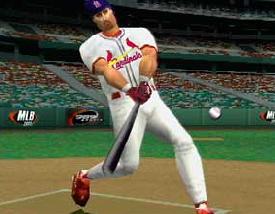
This year’s version does look a little better than MLB ’99, but not by much. Most gamers probably won’t even notice the minor differences. The animations are the same, from the batter stepping into the box to the pitcher’s celebration after a strikeout. Of course, last year’s graphics were hardly shabby. Players run, dive, leap, slide, throw, and move naturally without any jerkiness. The players look physically different from one another (Mark McGwire has a different build than say, Greg Maddux), and many different batting stances and pitching deliveries are included.
Control-wise, MLB 2000 is virtually identical to last year. You have a batting cursor which gives you control of where you want to hit the ball, while the pitching system lets you place your pitches wherever you desire. You can also control the speed of the pitches. Total control hitting is still here, where you can guess which zone the pitch is going to be placed. Guess correctly and you will be ‘locked on’ to the pitch, leaving you only to time the swing correctly to get a good hit. Guess wrong and the batting cursor will shrink in size, minimizing your chances of getting good wood on the ball.
Fielding hasn’t changed much either. Throwing to the proper base is simple: each button on the control pad represents a base to throw to when a player has the ball. If that’s too hard for you, there is an option to turn on
‘automatic fielding.’ Another nice feature is the turbo button, which allows you to reach balls you normally wouldn’t be able to get to running at normal speed.
For MLB 2000, 989 Studios added Dave Campbell to do the color commentary. Back to do the play by play is announcer Vin Scully. While Scully does sound very close to the way he does during a normal game, I just couldn’t help getting sleepy after listening to him for a while. The sound effects are nice, and the sharp crack of the bat is clear and realistic. The crowd will cheer, boo, and occasionally do the bleacher stomp.
Finally, after pounding in the fact that this game is pretty much identical to ’99, I must tell you of one MAJOR overhaul. Drum roll please (the suspense is killing you isn’t it?)…the menu interface! Yes, the menus have a whole new look. Oh happy day! Navigating through them to find a particular feature is a breeze, and it’s very user-friendly.
Ultimately, MLB 2000 is not much, if any, of an improvement over MLB ’99. This isn’t so bad since MLB ’99 is a very good
game, but if you already own it, you’ll have to think long and hard about whether or not you should buy the update. As for the people who can’t decide on Triple Play 2000 or MLB 2000, both are great and you can’t go wrong with either one. MLB is more of a baseball sim, whereas Triple Play has more of that arcade feel. Take your pick.
-
Realistic/smooth player animations
-
User-friendly interface
-
Almost Identical to MLB '99
-
Dull voice of Vin Scully
-
Almost Identical to MLB '99